

Choosing between 8GB and 16GB RAM is an important decision when buying a laptop in 2026. Whether you are a student, office professional, business owner, gamer or content creator, your RAM capacity affects multitasking and application performance. But which option should you choose? Who actually needs 16GB RAM? Where does 8GB perform well? When should you upgrade? Why does RAM matter? And how can you select the right configuration?
This guide compares both options through practical examples, everyday workloads and purchasing considerations. It will help you choose a laptop that matches your requirements and budget.
Quick Answer: 8GB RAM is suitable for basic browsing, documents, online classes and everyday office tasks. However, 16GB RAM is a better choice for regular multitasking, demanding applications and longer-term flexibility.
What Is RAM and Why Does It Matter?
RAM stands for Random Access Memory. It is the temporary working memory that your laptop uses while running applications.
Whenever you open a browser, launch Microsoft Excel, edit documents or attend an online meeting, your laptop uses RAM to keep active data readily accessible.
Think of RAM as your working desk.
A larger desk allows you to keep more documents open without constantly moving things around. Similarly, more RAM allows your laptop to handle more active applications without running out of available memory as quickly.
RAM vs Storage: What’s the Difference?
Many laptop buyers confuse RAM with storage. However, both components perform different functions.
| Comparison | RAM | Storage (SSD/HDD) |
|---|---|---|
| Main purpose | Temporary working memory | Permanent file storage |
| Stores | Active application data | Documents, photos and software |
| Performance impact | Multitasking capacity | File loading and application startup |
| Measurement | GB | GB or TB |
| Data retention | Temporary | Permanent until deleted |
| Example | 8GB or 16GB | 256GB or 512GB SSD |
Expert Insight: More RAM does not automatically make every laptop faster. Processor performance, SSD speed, cooling and software requirements also influence overall performance.
Is 8GB RAM Enough for a Laptop in 2026?
Yes, 8GB RAM can still be sufficient for everyday computing in 2026. You do not necessarily need 16GB if your laptop usage is limited to basic applications.
An 8GB laptop can support many common activities, including:
- Browsing websites and checking emails.
- Creating Word documents and presentations.
- Working with standard Excel sheets.
- Attending online classes and meetings.
- Watching videos and streaming content.
- Using basic accounting software.
- Performing everyday office tasks.
However, performance depends on the number of applications running simultaneously.
For example, opening a few browser tabs and working on a document is different from keeping 25 tabs open while running Excel, Teams and other applications.
When Should You Choose 8GB RAM?
Consider 8GB RAM if:
- Your work mainly involves browsing and document editing.
- You use basic office applications.
- You attend online classes occasionally.
- You have a limited laptop budget.
- You do not regularly run demanding applications.
Expert Tip: Before purchasing an 8GB laptop, check whether its RAM can be upgraded. This provides additional flexibility if your computing requirements increase later.
8GB Laptop RAM Price in India
-
2133 Mhz (Laptop)
So-Dimm 8GB DDR4 PC4-17000 (2133 Mhz) RAM (Memory) For Laptop
₹7,999.00Original price was: ₹7,999.00.₹4,499.00Current price is: ₹4,499.00. including 18% GST Add to cart -
1600 Mhz (Laptop)
So-Dimm 8GB DDR3 PC3L-12800 (1600 Mhz) RAM (Low Voltage Memory) For Laptop
₹2,999.00Original price was: ₹2,999.00.₹1,749.00Current price is: ₹1,749.00. including 18% GST Add to cart -
8GB (Laptop)
So-Dimm 8GB DDR3 PC3-8500 (1066 Mhz) RAM (Memory) For Laptop
₹2,999.00Original price was: ₹2,999.00.₹1,749.00Current price is: ₹1,749.00. including 18% GST Add to cart



4. Is 16GB RAM Better for a Laptop?
For most users who regularly multitask, 16GB RAM is the more flexible option.
Modern workflows often involve several applications running together. An office employee might use Microsoft Excel, Chrome, Outlook, Teams and accounting software simultaneously.
With 16GB RAM, the laptop has more memory available for these applications.
Who Should Choose 16GB RAM?
Office Professionals: Work with multiple spreadsheets, browser tabs, presentations and communication applications.
Students: Attend online classes, research information and prepare assignments simultaneously.
Developers: Run development environments, browsers, code editors and selected virtual machines.
Content Creators: Work with photo editing, design applications and moderate video editing projects.
Business Owners: Manage CRM platforms, business applications, spreadsheets and online meetings.
Expert Insight
If you regularly switch between several applications, 16GB RAM can provide a smoother experience by reducing memory pressure.
However, demanding creative applications may require 32GB RAM or more. Always check the software manufacturer’s recommended specifications.
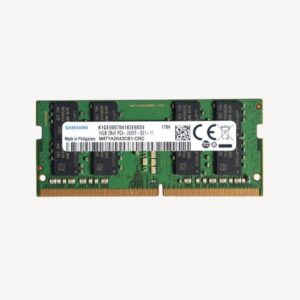
16GB Laptop RAM Price in India
-
2133 Mhz (Laptop)
So-Dimm 16GB DDR4 PC4-17000 (2133 Mhz) RAM (Memory) For Laptop
₹14,999.00Original price was: ₹14,999.00.₹8,199.00Current price is: ₹8,199.00. including 18% GST Add to cart -
16GB (Desktop)
16GB DDR4 PC4-17000 (2133 Mhz) RAM (Memory) For Desktop
₹14,999.00Original price was: ₹14,999.00.₹8,199.00Current price is: ₹8,199.00. including 18% GST Add to cart -
2400 Mhz (Laptop)
So-Dimm 16GB DDR4 PC4-19200 (2400 Mhz) RAM (Memory) For Laptop
₹14,999.00Original price was: ₹14,999.00.₹8,199.00Current price is: ₹8,199.00. including 18% GST Add to cart


Which RAM Capacity Is Better for Different Users?
The right RAM capacity depends on your actual workload. A student preparing assignments does not have the same requirements as a video editor or software developer.
Use this table as a starting point.
| User Category | Recommended RAM | Why? |
|---|---|---|
| Basic home users | 8GB | Browsing and everyday activities |
| School students | 8GB–16GB | Classes, documents and research |
| College students | 8GB–16GB | Depends on course requirements |
| Office professionals | 16GB | Better multitasking flexibility |
| Accountants | 8GB–16GB | Depends on spreadsheet size |
| Business executives | 16GB | Multiple applications and meetings |
| Programmers | 16GB or more | Development tools and projects |
| Graphic designers | 16GB–32GB | Larger creative projects |
| Video editors | 16GB–32GB or more | Depends on resolution and workload |
| Gamers | 16GB–32GB | Depends on game requirements |
Important: These are general recommendations, not universal minimum requirements. Actual RAM requirements depend on the operating system, applications, workload and hardware configuration.
Does 16GB RAM Make a Laptop Faster?
It can, but the improvement depends on your existing memory usage.
Consider two practical situations.
Situation 1: Basic Laptop Usage
You open a browser, check emails and work on a Word document.
An 8GB laptop may already handle these tasks comfortably. Upgrading to 16GB might not create a dramatic speed improvement.
Situation 2: Heavy Multitasking
You open multiple browser tabs, run Excel, attend a Teams meeting and work with several applications.
An 8GB laptop may run short of available memory. Windows can then move some data between RAM and storage, which is slower than accessing RAM directly.
With 16GB, the laptop has more room to manage these applications.
Remember: If your laptop has a slow processor, overheating issues or an HDD, upgrading RAM alone may not solve every performance problem.
What Else Affects Laptop Performance?
- Processor: Handles calculations and application instructions.
- RAM: Supports active applications and multitasking.
- SSD: Helps improve startup and file-loading times.
- Cooling: Helps maintain performance under demanding workloads.
- Graphics: Supports visual processing and graphics-intensive applications.
A balanced configuration is more important than upgrading only one component.
Frequently Asked Questions
FAQ 1: Is 8GB RAM enough for a laptop in 2026?
Yes. 8GB RAM is suitable for browsing, documents, online classes and basic office applications. However, heavy multitasking benefits from additional memory.
FAQ 2: Is 16GB RAM better than 8GB RAM?
Yes, for multitasking and demanding applications. It provides more memory headroom and can reduce performance limitations when several applications run together.
FAQ 3: Does 16GB RAM make a laptop faster?
It can improve responsiveness when an 8GB system runs out of available memory. However, it will not automatically improve performance when the existing RAM is already sufficient.
FAQ 4: Which RAM is better for students, 8GB or 16GB?
8GB can support basic educational activities. However, 16GB is more suitable for students using multiple applications, programming tools or creative software.
FAQ 5: Is 8GB RAM enough for office work?
Yes, for basic documents, emails and standard spreadsheets. However, 16GB is a better choice for employees who frequently multitask.
FAQ 6: Is 16GB RAM enough for gaming?
16GB is a suitable baseline for many modern games. However, demanding games, streaming and background applications may benefit from 32GB. Always check individual game requirements.
FAQ 7: Can I upgrade my laptop from 8GB to 16GB RAM?
Many laptops support RAM upgrades. However, some models use soldered memory or have limited upgrade options. Check the manufacturer’s specifications first.
FAQ 8: Does more RAM increase laptop battery consumption?
Additional RAM can slightly affect power consumption, but battery life depends on several components, including the processor, display, battery and workload.
FAQ 9: Is 16GB RAM future-proof?
It provides more flexibility for many everyday and professional workloads. However, specialised applications and demanding workloads may require 32GB or more.
FAQ 10: Should I buy an 8GB refurbished laptop or a 16GB refurbished laptop?
Choose according to your workload and budget. An 8GB model can suit basic usage, while 16GB is generally preferable for multitasking and longer-term flexibility. Also check processor performance, SSD, battery condition and warranty.
About Vision IT
Vision IT Peripherals Pvt. Ltd. supplies refurbished laptops, desktops, workstations and IT peripherals for businesses, professionals and educational institutions.
With business laptops from Dell, HP and Lenovo, configuration options, genuine Windows licensing on eligible systems and available warranty support, Vision IT helps customers find suitable computing solutions.
Explore: www.visionit.in
Editorial Information
Author: Vision IT Editorial Team
Technical Reviewer: Chetan Vichare
Last Updated: November 2026
Editorial Note: RAM recommendations are general guidelines. Actual performance depends on laptop configuration, operating system, software requirements and workload.
