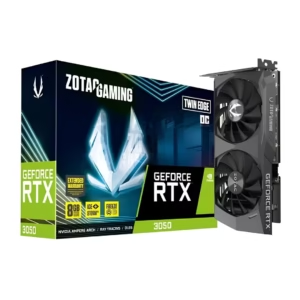
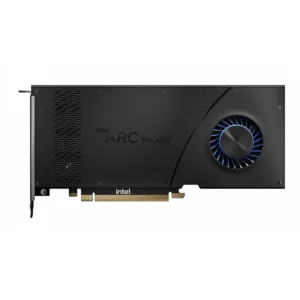
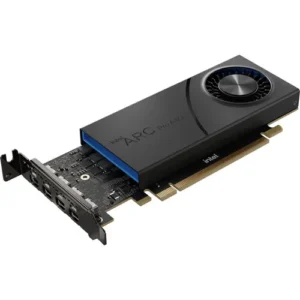
Upgrade your PC’s graphics performance with high-quality graphic cards from top brands. Whether you’re a gamer, video editor, designer, or professional, our range of GPUs delivers smooth visuals, faster rendering, and enhanced performance.
Graphics Card for Gaming, Design & Professional Workstations
Enhance your desktop with a graphics card built for your workflow. Vision IT provides a wide selection of graphics cards and GPUs. They suit gaming, video editing, 3D design, CAD, engineering, multimedia, and professional workstation apps.
Choose from entry-level, performance and professional graphics cards with different memory capacities, interfaces and display-output configurations.
Whether you need a GPU for gaming, video editing, or CAD and 3D work, check your system first.
Before you buy, review the specifications and make sure it is compatible.
Buy Graphics Cards Online
A GPU, also called a GPU or video card, processes and renders visual information for your computer. The right graphics card can boost performance in apps like gaming, 3D modelling, CAD, video editing, and professional visualization.
Vision IT offers GPU for different performance requirements, from basic display and multimedia applications to professional workstation workloads.
Before choosing a graphics card, check your computer’s:
PCIe slot
Power supply capacity
Available cabinet space
Display connections
Operating-system support
Application requirements
Required graphics memory
Choose a Graphics Card by Use Case
Graphics Cards for Gaming
Gaming GPUs are designed to handle real-time 3D graphics and demanding visual workloads.
When choosing a gaming graphics card, consider:
GPU model
VRAM capacity
Supported resolution
Display outputs
Power requirements
Game requirements
CPU compatibility
The ideal graphics card depends on the games you play, target resolution and desired graphics settings.
Graphics Cards for Video Editing
Video editing applications can use GPU acceleration for effects, encoding, playback and other workloads.
A suitable graphics card helps creators work with high-resolution video, effects-heavy timelines, and demanding editing apps.
Check the GPU requirements recommended by your editing software before purchasing.
Graphics Cards for 3D Design and Rendering
3D modelling, rendering, animation and visualization workloads can benefit from dedicated graphics processing.
For professional applications, compare the GPU’s:
VRAM
Compute performance
Software compatibility
Display support
Driver support
Application certification where applicable
Graphics Cards for CAD and Engineering
CAD and engineering applications can have specific GPU requirements. Professional workstation graphics cards may be appropriate when software certification, stability and professional drivers are important.
Vision IT offers professional workstation graphics cards suitable for compatible CAD, engineering, design and visualization workflows.
Graphics Cards for Office and Basic Display
Not every computer requires a high-performance GPU.
Entry-level graphics cards are useful for systems that need more display outputs. They also help with older hardware, basic multimedia, and multi-monitor support.
Choose the GPU based on the actual workload rather than paying for performance you do not need.
Professional Workstation Graphics Cards
Professional graphics cards are designed for applications such as:
CAD
3D modelling
Engineering
Architecture
Animation
Scientific visualization
Professional video workflows
Content creation
Professional workstation GPUs can offer features such as multi-display support, professional drivers and application-specific optimization depending on the model.
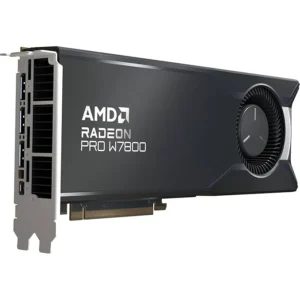
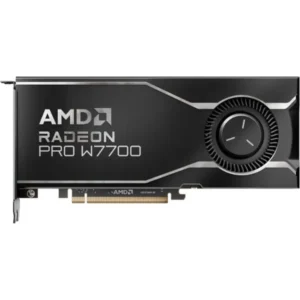
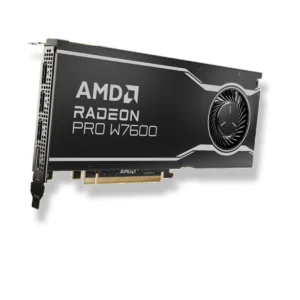
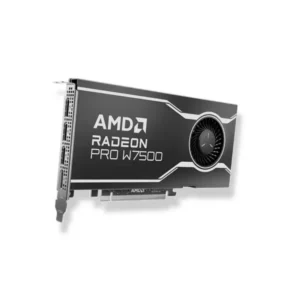
For example, Vision IT’s current category includes AMD Radeon Pro W7500, W7600, W7700 and W7800 professional graphics cards.
Always check the requirements of your professional software before selecting a workstation GPU.
How to Choose the Right Graphics Card
1. Check Your PCIe Slot
Most modern desktop graphics cards use a PCI Express interface. Check the motherboard and available slot before purchasing.
Older computers may use different interfaces. Check compatibility with care.
2. Check VRAM
VRAM is dedicated graphics memory used by the GPU for textures, frames and other graphics data.
The amount of VRAM you need depends on the games, applications, resolution and workload.
3. Check Power Requirements
Higher-performance graphics cards can require additional power connectors and a suitable power supply.
Before upgrading, check:
PSU wattage
PCIe power connectors
GPU power requirements
Available cabinet space
4. Check Physical Size
Graphics cards can vary considerably in length, height and thickness.
Make sure your PC cabinet has enough space and that neighbouring expansion slots will not create a clearance problem.
5. Check Display Outputs
Depending on your monitor configuration, you may need outputs such as:
HDMI
DisplayPort
DVI
VGA
Check the graphics card and monitor connections before purchasing.
6. Check Software Compatibility
Professional applications can have specific GPU and driver requirements.
For CAD, 3D modelling, video editing and other professional workloads, check the software manufacturer’s recommended hardware specifications.
What Is VRAM?
VRAM stands for Video Random Access Memory.
It is memory the graphics processor uses to store graphics data.
A graphics card with more VRAM can help with high-resolution textures.
It can also help with large scenes, multiple displays, and demanding visual apps.
However, VRAM capacity alone does not determine overall GPU performance. GPU architecture, processing capability, memory bandwidth, software optimization and workload all matter.
Graphics Card vs Integrated Graphics
Integrated graphics are built into the processor or system platform and share system resources.
A dedicated graphics card has its own GPU and dedicated graphics memory.
Integrated graphics can be suitable for:
Office work
Web browsing
Video playback
Basic productivity
Everyday computing
Dedicated graphics cards are useful for:
Gaming
3D modelling
CAD
Video editing
Rendering
Professional visualization
GPU-accelerated applications
The right option depends on your workload and performance requirements.
AMD, NVIDIA and Professional GPUs
Graphics cards are available across different GPU platforms and product families.
When comparing GPUs, look beyond the brand and consider:
GPU model
VRAM
Performance class
PCIe interface
Power requirements
Display outputs
Driver support
Software compatibility
Warranty
Vision IT’s current graphics card inventory includes AMD Radeon Pro professional GPUs and cards from other brands. It also includes cards from other generations.
Graphics Card for Workstation
A workstation graphics card is designed for professional workloads where application compatibility, stability, multi-display support and professional driver features can be important.
Professional GPU applications can include:
Engineering
CAD
Architecture
3D modelling
Animation
Simulation
Data visualization
Professional content creation
For professional applications, select the graphics card based on the software’s recommended or certified hardware requirements.
Graphics Card Compatibility Checklist
Before purchasing a graphics card, verify:
Motherboard: PCIe slot compatibility
Power supply: Required wattage and connectors
Cabinet: Available length, height and slot clearance
Monitor: Required display outputs
CPU: System balance and compatibility
Operating system: Supported drivers
Software: Application requirements
VRAM: Required graphics memory
Physical dimensions: Single-slot, dual-slot or larger design
Frequently Asked Questions
What is a graphics card?
A graphics card is a hardware component containing a GPU that processes and renders graphics and visual data. Dedicated graphics cards can improve performance in gaming, professional applications and other GPU-intensive workloads.
Which graphics card should I buy for gaming?
The right gaming GPU depends on your games, target resolution, graphics settings, CPU, power supply and budget. Check the recommended requirements of the games you intend to play.
How much VRAM do I need?
The required VRAM depends on the application, resolution, textures and workload. Gaming, professional 3D applications and high-resolution creative workflows can have different requirements.
Is a graphics card necessary for video editing?
Not always. Many video-editing applications can operate without a dedicated GPU, but compatible graphics hardware can accelerate certain effects, encoding, playback and rendering tasks.
What graphics card is suitable for CAD?
The appropriate GPU depends on the CAD software, project complexity and required features. Professional workstation GPUs can be suitable for applications where certified drivers and professional support are important.
Can I install any graphics card in my desktop?
No. You need to check the motherboard’s PCIe slot, power supply, cabinet clearance, power connectors and operating-system support.
Does a graphics card need a separate power connection?
Some graphics cards get enough power from the PCIe slot. Higher-performance models may need extra power connectors from the PSU. Check the specific GPU’s power requirements.
Is more VRAM always better?
Not necessarily. VRAM is only one part of GPU performance. GPU architecture, processing capability, memory bandwidth, software optimization and workload also affect performance.
What is a professional workstation GPU?
Engineers and creators use a professional workstation GPU for CAD, engineering, 3D modeling, visualization, and content creation. Professional models may provide application-specific drivers and certifications depending on the product.
Can I use a workstation graphics card for gaming?
Some workstation GPUs can run games, but manufacturers design them primarily for professional workloads. A gaming-focused GPU may be a better choice when gaming performance is the main requirement.
Need Help Choosing a Graphics Card?
Not sure which GPU works with your desktop?
Share your desktop model, motherboard model, existing graphics card, power supply details and intended workload with Vision IT.
Our team can help you identify a suitable graphics card based on compatibility, performance requirements and use case.
Browse the available graphics cards above and compare the specifications before purchasing.