

Choosing the right motherboard for Ryzen 5 7500F is important when building a gaming PC or performance desktop. The Ryzen 5 7500F uses the AM5 socket and DDR5 memory. It also requires a dedicated graphics card. Therefore, your motherboard should match your RAM, GPU, storage, budget, and future upgrade plans. For most users, B650 offers the best balance. However, A620 is a good choice for a budget build.
Ryzen 5 7500F Motherboard Compatibility
The Ryzen 5 7500F is part of AMD’s Ryzen 7000 series. It uses the AM5 socket, so older AM4 motherboards such as B450 and B550 are not compatible.
AMD supports the processor on several AM5 chipsets, including A620, B650, B650E, X670, and X670E. Therefore, you have several motherboard options depending on your budget and requirements.
The Ryzen 5 7500F also uses DDR5 memory. So, your basic PC build needs:
- AM5 motherboard
- DDR5 RAM
- Dedicated graphics card
- CPU cooler
- SSD
- Suitable power supply
- Compatible PC case
Most importantly, remember that the Ryzen 5 7500F needs a dedicated GPU. Therefore, do not plan a build around motherboard display outputs alone.
A620 Motherboard for Ryzen 5 7500F
A620 is the entry-level AM5 chipset. Therefore, it is suitable when your main goal is to keep the total PC cost low.
An A620 motherboard for Ryzen 5 7500F works well for:
- Budget gaming PCs
- Office computers
- Home PCs
- Entry-level workstations
- Basic content creation
A620 supports DDR5 and AMD EXPO memory. However, CPU overclocking is not supported. It can also have fewer expansion and connectivity features than more expensive chipsets.
Therefore, A620 is a good option when you need the basic AM5 platform without paying for advanced features.
However, check the exact motherboard model before buying. The number of M.2 slots, USB ports, RAM slots, Wi-Fi features, and VRM design can vary between boards.
B650 Motherboard for Ryzen 5 7500F
For most users, B650 is the best motherboard for Ryzen 5 7500F.
B650 sits in the mainstream segment and provides a strong balance between price and features. It is especially suitable for gaming and general performance PCs.
A good B650 motherboard can provide:
- DDR5 support
- Multiple M.2 slots
- Better expansion options
- More USB connectivity
- Stronger VRM designs
- AMD EXPO support
- CPU overclocking support
- Better future upgrade flexibility
Therefore, if your budget allows it, B650 should be your first choice.
A combination such as Ryzen 5 7500F + B650 + 32GB DDR5 + dedicated GPU creates a well-balanced gaming system.
Is B650E Worth It?
B650E is a higher-end AM5 option. Its main advantage is broader PCIe 5.0 support.
However, most Ryzen 5 7500F gaming PCs do not need B650E.
Choose it when you specifically need additional PCIe 5.0 connectivity, high-end storage, or more advanced expansion options. Otherwise, a good B650 motherboard usually provides better value.
Do You Need X670 or X670E?
Usually, no.
X670 and X670E are better suited to users who need extensive connectivity and expansion. They can make sense for professional workstations, multiple NVMe SSDs, several expansion cards, or enthusiast systems.
However, an expensive motherboard does not automatically make the Ryzen 5 7500F faster.
Therefore, for a gaming PC, putting the extra budget into the graphics card can often provide more practical performance.
RAM for Ryzen 5 7500F
The Ryzen 5 7500F requires DDR5 RAM. You cannot use DDR4 memory with an AM5 motherboard designed for this processor.
For basic gaming and everyday work, 16GB can be sufficient. However, 32GB is a better long-term choice for gaming, streaming, editing, programming, and multitasking.
A 2 × 16GB DDR5 kit is a practical configuration. Additionally, an AMD EXPO-compatible kit can help you use supported memory profiles more easily.
Always check the motherboard’s memory support list when possible because supported speeds and memory configurations vary between models.
You can also explore available RAM options when planning your build.
SSD and M.2 Storage
An NVMe SSD is a good match for a modern Ryzen 5 7500F system. It can provide fast loading for Windows, applications, games, and large files.
For most users, 1TB is a practical starting point. A 500GB drive can work for a basic PC, while 2TB makes more sense for large game libraries and professional files.
If you expect to add another SSD later, choose a motherboard with multiple M.2 slots.
You can check SSD storage options based on your storage requirements.
VRM and Power Delivery
VRM stands for Voltage Regulator Module. It controls how power is delivered to the processor.
The Ryzen 5 7500F has a 65W default TDP. Therefore, you do not need an extremely expensive VRM design just to run this CPU.
A good-quality A620 or B650 motherboard is sufficient for the 7500F.
However, if you plan to upgrade to a higher-end AM5 processor later, choosing a stronger B650 motherboard can provide more flexibility.
BIOS Support
BIOS compatibility is also important, particularly with older motherboard stock.
Before purchasing, check the manufacturer’s CPU support list and confirm that the motherboard supports the Ryzen 5 7500F.
Features such as BIOS Flashback, Flash BIOS, or Q-Flash Plus can also make BIOS updates easier on supported models.
Therefore, do not judge a motherboard only by its chipset name. Check the exact model specifications.
Features to Check Before Buying
Before choosing your Ryzen 5 7500F motherboard, check these features:
- AM5 socket
- DDR5 support
- Ryzen 5 7500F BIOS support
- Number of RAM slots
- Number of M.2 slots
- PCIe slot for your GPU
- USB ports
- Wi-Fi and Bluetooth, if required
- Ethernet speed
- Audio connectivity
- VRM quality
- BIOS update features
These details can make a bigger difference to your experience than simply choosing between chipset names.
Ryzen 5 7500F Motherboard Comparison
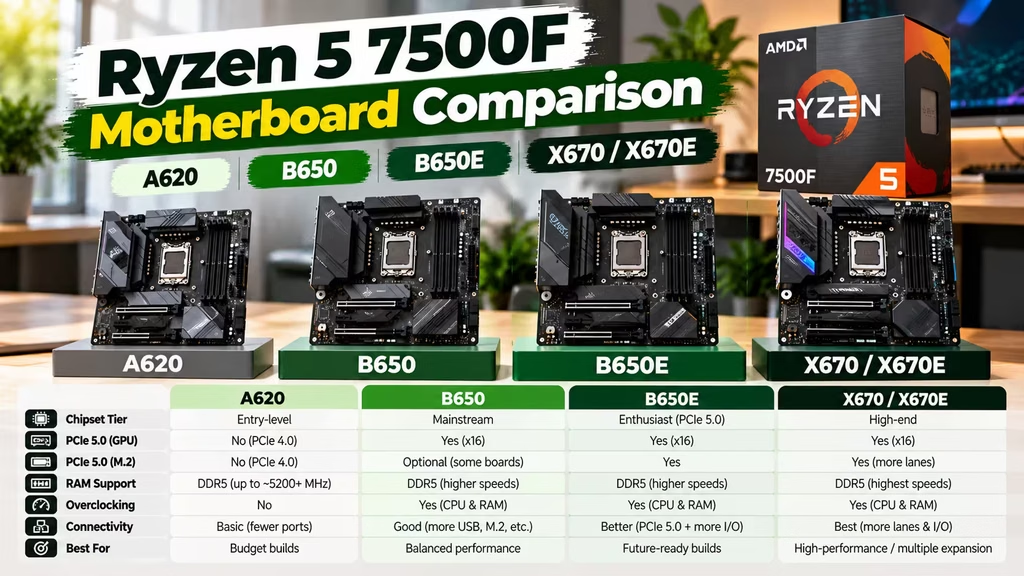
| Feature | A620 | B650 | B650E | X670/X670E |
|---|---|---|---|---|
| Socket | AM5 | AM5 | AM5 | AM5 |
| DDR5 | Yes | Yes | Yes | Yes |
| 7500F Support | Yes | Yes | Yes | Yes |
| CPU Overclocking | No | Yes | Yes | Yes |
| Expansion | Basic | Good | Very Good | Excellent |
| PCIe Features | Basic | Strong | More PCIe 5.0 | High-end |
| Best For | Budget PCs | Gaming & general use | Enthusiast builds | Workstations |
| Value for 7500F | Good | Best | Depends on need | Usually unnecessary |
For a budget PC, choose A620.
For most gaming and performance builds, choose B650.
Choose B650E when you specifically need its additional PCIe capabilities. Meanwhile, X670 or X670E makes sense mainly for heavy expansion and workstation requirements.
Frequently Asked Questions
Which motherboard is best for Ryzen 5 7500F?
For most users, B650 is the best overall choice. It provides a good combination of price, features, storage options, connectivity, and upgrade flexibility.
Can Ryzen 5 7500F work with A620?
Yes. A620 is compatible with the Ryzen 5 7500F. However, it offers fewer features and does not support CPU overclocking.
Is B650 overkill for Ryzen 5 7500F?
No. B650 is a sensible match. It gives you more expansion and upgrade flexibility without requiring an expensive enthusiast motherboard.
Does Ryzen 5 7500F support DDR5?
Yes. The processor uses DDR5 memory on the AM5 platform.
Can I use DDR4 RAM?
No. You need DDR5 RAM for a Ryzen 5 7500F AM5 system.
Does Ryzen 5 7500F need a graphics card?
Yes. You should use a dedicated graphics card with the Ryzen 5 7500F.
Is A620 good for gaming?
Yes. A620 can be a good budget gaming option. However, B650 is better if you want additional features and future upgrade flexibility.
How much RAM should I use?
16GB is enough for basic use and gaming. However, 32GB is a better choice for modern gaming, editing, streaming, and heavy multitasking.
Do I need X670 for Ryzen 5 7500F?
No. X670 is unnecessary for most gaming builds. Consider it only if you need extensive expansion and connectivity.
Can I upgrade the CPU later?
Yes. The AM5 platform supports multiple generations of processors. However, exact CPU compatibility depends on the motherboard and BIOS version.
Final Verdict
Final Verdict
Choosing the right motherboard for Ryzen 5 7500F mainly depends on your budget, gaming needs, and future upgrade plans. A620 is a practical option if you are building a budget PC and only need the essential AM5 features. However, B650 is the better choice for most users because it offers more expansion, storage, connectivity, and upgrade flexibility.
If you are building a gaming PC, the Ryzen 5 7500F + B650 + 32GB DDR5 + 1TB NVMe SSD + Dedicated GPU combination offers a strong balance of performance and value. You do not need to spend extra on X670 or B650E unless you specifically need their additional connectivity or PCIe features.
In short, choose A620 for a budget build, B650 for the best overall value, and B650E or X670/X670E for advanced builds. The best motherboard is the one that gives your Ryzen 5 7500F the features you actually need without wasting your budget.
You can also explore motherboards, RAM, and SSD storage.
For Windows, check Genuine Microsoft Windows Licenses.
