

Finding the best laptops for graphic design can be difficult because every designer has different needs. A student may need a laptop for Photoshop, Illustrator, and college projects. Meanwhile, a professional designer may need more RAM, a better display, faster storage, and stronger graphics performance. Therefore, the best laptop depends on your software, workload, budget, and how often you travel. In this guide, we explain what to look for and how to choose the right laptop for graphic design.
Best Laptops for Graphic Design: What Do You Really Need?
Graphic design does not always require an extremely expensive laptop. However, the right specifications can make creative work much easier.
For basic design work, a modern processor, 16GB RAM, SSD storage, and a good display can provide a smooth experience. On the other hand, demanding projects may require more memory, a stronger processor, and a dedicated graphics card.
Therefore, before buying, consider these important specifications:
- Processor
- RAM
- SSD storage
- Display quality
- Color accuracy
- Graphics card
- Screen resolution
- Battery life
- Portability
- Upgradeability
- Warranty
Most importantly, match the laptop to the software you actually use.
A person working mainly with Photoshop and Canva has different requirements from someone creating 3D designs, animations, or professional video content. Therefore, software should be the first step when choosing a laptop.
What Software Will You Use?
Start by making a list of your main applications.
Common graphic design software includes:
- Adobe Photoshop
- Adobe Illustrator
- CorelDRAW
- Figma
- Canva
- Adobe InDesign
- Affinity Designer
- Adobe Lightroom
For example, Photoshop and Illustrator can work well on a capable mid-range laptop. However, 3D applications and heavy creative workloads can benefit from stronger graphics hardware.
Therefore, identify your main applications before comparing laptop specifications.
Best Laptop Specifications for Graphic Design
Once you know your software requirements, you can compare hardware.
Processor
The processor affects how quickly your laptop handles applications, filters, effects, exports, and multitasking.
For students and basic designers, a modern Core 5, Core 7, Ryzen 5, or similar processor can be a good starting point. However, professional work can benefit from higher-performance processors.
For professional projects, a stronger processor can reduce waiting time when applying effects, exporting files, or working with multiple applications.
Consequently, processor performance becomes more important as your projects become larger and more complex.
However, do not choose a processor based only on the Core i5, Core i7, or Ryzen 7 name.
Processor generation and the exact model also matter. For example, an older high-end processor may not always be the best choice compared with a newer, more efficient processor.
RAM
RAM is one of the most important specifications for graphic design.
When you open Photoshop, Illustrator, a browser, and other applications together, they all use system memory. Therefore, having enough RAM helps with multitasking and larger projects.
A practical guide is:
| Graphic Design Workload | Recommended RAM |
|---|---|
| Basic Canva and simple design | 8GB |
| Student graphic design | 16GB |
| Photoshop and Illustrator | 16GB |
| Professional design | 16GB–32GB |
| Large Photoshop projects | 32GB |
| Heavy creative multitasking | 32GB or more |
For most serious graphic design users, 16GB RAM is a good starting point. However, 32GB can provide more headroom if you regularly work with large files or multiple creative applications.
You can also explore RAM for laptops and desktops when upgrading a compatible system.
SSD Storage
An SSD is important for everyday performance.
It helps Windows, design applications, and project files load faster than traditional hard drives. Therefore, a laptop with SSD storage is generally preferable for creative work.
For graphic designers, 512GB is a practical starting point. However, professionals may need 1TB or more because design files can become large very quickly.
For example, RAW photographs, Photoshop projects, videos, fonts, templates, and project assets can consume storage over time.
A simple guide is:
- 256GB: Basic use
- 512GB: Good for students and general designers
- 1TB: Better for professionals
- 2TB or more: Heavy creative workloads
If your laptop supports storage upgrades, you can also increase its capacity later. Therefore, upgradeability can be useful when your storage requirements grow.
Explore SSD storage when you need additional storage for a compatible laptop or desktop.
Display Quality
For graphic design, the display is extremely important.
You are looking at colors, shadows, highlights, gradients, and fine details for hours. Therefore, a poor display can make accurate design work difficult.
Look for:
- Full HD or higher resolution
- Good brightness
- Good contrast
- Wide viewing angles
- High color coverage
- Accurate color reproduction
For general design work, strong sRGB coverage is useful. Meanwhile, professional color-sensitive work may benefit from a wider color-gamut display.
Therefore, do not choose a laptop only because it has a powerful processor.
A powerful laptop with a poor display may be less useful to a graphic designer than a slightly slower laptop with a much better screen.
Graphics Card
Do graphic designers need a dedicated graphics card?
Not always. For Photoshop, Illustrator, Figma, Canva, and other 2D applications, integrated graphics can be sufficient for many users.
However, a dedicated GPU becomes more useful when your work includes:
- 3D design
- Animation
- Motion graphics
- Video editing
- 3D rendering
- GPU-heavy effects
- Advanced visual effects
Therefore, do not spend extra money on a dedicated GPU unless your applications can actually benefit from it.
Best Laptops for Graphic Design Students
Students usually have a limited budget. Therefore, they need a laptop that can handle assignments, presentations, browsing, design applications, and online classes without becoming unnecessarily expensive.
A good student configuration can include:
- Modern Core 5 or Ryzen 5 processor
- 16GB RAM
- 512GB SSD
- Full HD display
- Good color reproduction
- Reliable battery
- Comfortable keyboard
However, you do not necessarily need a premium creator laptop.
A properly tested refurbished business laptop can sometimes provide stronger hardware for the same budget. For example, a refurbished laptop with 16GB RAM and SSD storage may offer better value than a new entry-level laptop with weaker specifications.
Therefore, students should compare the complete configuration rather than simply choosing the newest model.
Best Laptops for Professional Graphic Designers
Professional designers generally need more than basic performance.
Large Photoshop files, multiple Illustrator documents, high-resolution images, and several applications running together can increase hardware requirements. Therefore, professional users should consider the complete system.
For professional work, consider:
- 16GB or 32GB RAM
- Fast 512GB or 1TB SSD
- Strong multi-core processor
- High-quality color-accurate display
- Dedicated GPU when required
- Good cooling
- Reliable connectivity
If you spend several hours every day designing, display quality and keyboard comfort also become important. Moreover, a reliable warranty can provide additional peace of mind.
Therefore, professional users should consider the entire laptop rather than focusing on one specification.
Best Laptop for Photoshop
Photoshop can run on many modern laptops. However, large documents with multiple layers, high-resolution images, filters, and effects can use significant memory.
Adobe’s current Photoshop requirements recommend 16GB or more RAM for the recommended configuration. Adobe also recommends a compatible GPU for GPU-accelerated features. Adobe Photoshop system requirements
Therefore, a good Photoshop laptop should have:
- 16GB RAM or more
- Fast SSD
- Modern processor
- Good display
- Compatible graphics hardware
If you regularly work with very large files, 32GB RAM can be a better long-term choice. As a result, you can work with larger projects and multiple applications more comfortably.
Best Laptop for Illustrator
Illustrator is another popular application for graphic designers.
It benefits from a capable processor, sufficient RAM, fast storage, and a good display. In addition, GPU acceleration can improve certain supported workflows.
Adobe recommends 16GB RAM for optimum Illustrator performance and a 1920 × 1080 display or higher. Adobe Illustrator system requirements
Therefore, prioritize:
- 16GB RAM
- SSD storage
- Modern processor
- Good display
- Suitable GPU
For vector design, logos, illustrations, posters, and marketing graphics, these specifications can provide a strong working experience.
MacBook vs Windows Laptop for Graphic Design
Both MacBook and Windows laptops can be excellent for graphic design.
However, the better choice depends on your software, budget, preferred operating system, and workflow.
MacBook for Graphic Design
MacBooks are popular with creative professionals because they combine strong performance, good displays, battery efficiency, and a polished operating system.
They can be excellent for:
- Photoshop
- Illustrator
- Lightroom
- Figma
- Video editing
- UI/UX design
- Creative work
However, configuration matters. A MacBook with more RAM and storage can be significantly more useful for professional work than a lower-spec configuration.
Therefore, compare the complete specification before buying.
Windows Laptop for Graphic Design
Windows provides a much wider range of hardware and prices.
You can choose laptops from brands such as Dell, HP, Lenovo, ASUS, Acer, MSI, and others. In addition, Windows provides more choices for dedicated NVIDIA and AMD graphics cards.
Therefore, Windows can be a strong option for designers who need specific software, dedicated GPU performance, or a particular budget.
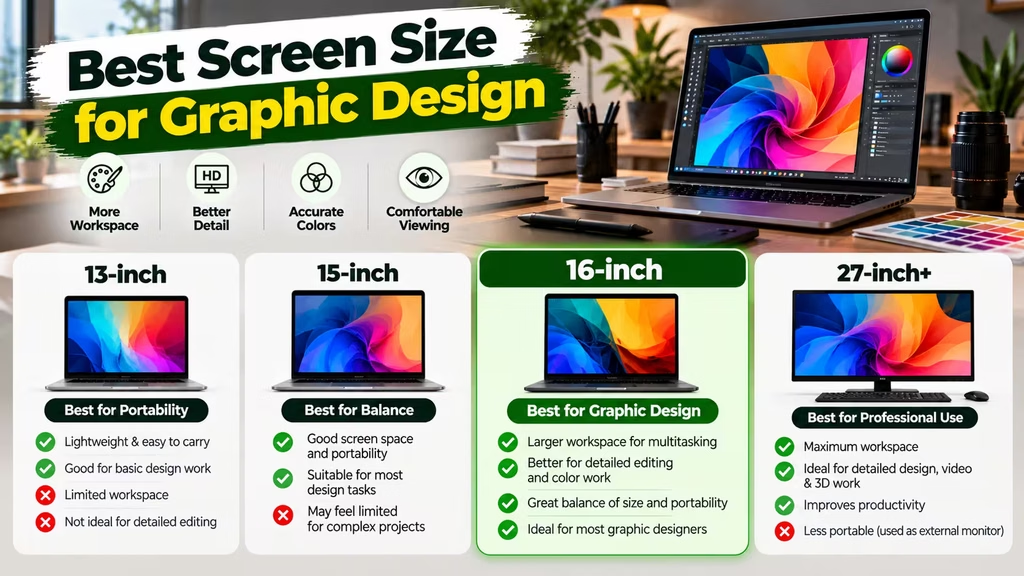
Best Screen Size for Graphic Design
Screen size affects both workspace and portability.
14-inch Laptop
A 14-inch laptop is easier to carry. Therefore, it can be a good choice for students, freelancers, and travelling designers.
However, the smaller screen provides less workspace.
15.6-inch Laptop
A 15.6-inch laptop provides a useful balance.
It offers more screen space while remaining reasonably portable. Consequently, it can be a practical choice for many designers.
16-inch Laptop
A 16-inch laptop provides even more workspace.
This can be useful for:
- Photoshop
- Illustrator
- Video editing
- Large timelines
- Multiple windows
- Professional design work
However, it is usually heavier and less convenient to carry. Therefore, choose it when workspace matters more than portability.
Is a Refurbished Laptop Good for Graphic Design?
Yes, a refurbished laptop can be a good choice for graphic design when it has been properly tested.
In particular, older business-class laptops can offer strong build quality and useful specifications at lower prices. However, condition matters just as much as specifications.
Before buying, inspect:
- Display quality
- Dead pixels
- Battery health
- RAM
- SSD
- Processor
- GPU
- Keyboard
- Trackpad
- Ports
- Charger
- Physical condition
- Warranty
The display deserves special attention because graphic design depends heavily on accurate visuals.
Therefore, do not buy a refurbished laptop only because it is cheap. Instead, compare its complete configuration and condition.
Best Laptop for Graphic Design on a Budget
If you have a limited budget, focus on specifications that directly affect your work.
For example, a sensible budget configuration can include:
16GB RAM + 512GB SSD + modern processor + good Full HD display
This combination can handle many common design workloads. However, you may not need a powerful dedicated GPU unless you work with 3D, animation, or demanding video applications.
Similarly, you do not necessarily need the latest processor generation if a previous-generation professional laptop provides better overall specifications.
Therefore, comparing value is more important than simply choosing the newest model.
What to Check Before Buying a Graphic Design Laptop
Before purchasing, use this checklist.
Check the Processor
Confirm the exact processor model and generation.
Do not rely only on the Core i5, Core i7, or Ryzen 7 label. Instead, compare the actual processor specifications.
Check RAM
Aim for 16GB for serious graphic design. If your projects are large, consider 32GB.
Check the SSD
A 512GB SSD is a good starting point. However, choose 1TB or more if you regularly work with large files.
Check the Display
Look for:
- Resolution
- Color coverage
- Brightness
- Contrast
- Viewing angles
- Panel type
Most importantly, prioritize color accuracy for design work.
Check the GPU
Determine whether your software actually requires a dedicated GPU.
If not, you can potentially save money by choosing a laptop with capable integrated graphics.
Check Upgradeability
Find out whether the RAM and SSD can be upgraded.
This can help extend the useful life of the laptop. As a result, an upgradeable laptop can offer better long-term value.
Check Warranty
Warranty is especially important when buying a refurbished laptop.
Check the warranty period, coverage, and service process before purchasing.
For Windows-based systems, you should also ensure that the operating system is properly licensed. You can explore Genuine Microsoft Windows Licenses when required.
Best Laptops for Graphic Design: Quick Comparison
| Requirement | Student | Freelancer | Professional Designer |
|---|---|---|---|
| RAM | 16GB | 16GB–32GB | 32GB preferred |
| SSD | 512GB | 512GB–1TB | 1TB+ |
| Processor | Modern mid-range | Mid/high-range | High-performance |
| GPU | Integrated can work | Depends on workload | Dedicated if required |
| Display | Good Full HD | Color-accurate | High-quality color-accurate |
| Screen | 14–15.6 inch | 14–16 inch | 15.6–16 inch |
| Upgradeability | Useful | Recommended | Highly useful |
| Budget | Lower | Medium | Higher |
Frequently Asked Questions
What are the best laptops for graphic design?
The best laptops for graphic design depend on your workload. A good laptop should have enough RAM, fast SSD storage, a capable processor, and a quality display. However, professional users may also need a dedicated GPU.
How much RAM is needed for graphic design?
16GB is a good starting point for serious graphic design. However, 32GB is better for large Photoshop files, heavy multitasking, and demanding creative workflows.
Is 8GB RAM enough for graphic design?
8GB can work for basic design tasks. However, it may feel limiting with modern creative applications. Therefore, 16GB is a better target for students and professionals.
Is MacBook better than Windows for graphic design?
Neither is automatically better. MacBook provides strong performance and displays, while Windows offers a wider range of hardware and GPU options. Therefore, choose based on your software, budget, and workflow.
Do graphic designers need a dedicated graphics card?
No. Many 2D design workloads can run on integrated graphics. However, 3D design, animation, rendering, and GPU-heavy applications can benefit from a dedicated GPU.
Is a refurbished laptop good for graphic design?
Yes, if it has been properly tested and has suitable specifications. However, check the display, processor, RAM, SSD, battery, GPU, physical condition, and warranty before buying.
Is 512GB SSD enough for graphic design?
512GB is a good starting point for many designers. However, professionals working with large images, videos, and project files may benefit from 1TB or more.
What display is best for graphic design?
A high-quality display with good color accuracy, strong sRGB coverage, suitable brightness, and at least Full HD resolution is a good starting point. For professional work, wider color-gamut displays can be more suitable.
Which processor is best for graphic design?
There is no single best processor. A modern mid-range processor is sufficient for many users, while professional workloads can benefit from higher-performance processors. Therefore, always compare the exact processor model and generation.
Can a refurbished business laptop handle graphic design?
Yes. A suitable refurbished business laptop with a capable processor, 16GB RAM, SSD storage, and a good display can handle many graphic design applications. However, inspect the display and overall condition before purchasing.
Final Verdict
The best laptops for graphic design are the ones that match your actual work.
For students and beginners, a laptop with 16GB RAM, 512GB SSD, a modern processor, and a good Full HD display can be an excellent starting point.
For professional designers, 32GB RAM, 1TB SSD storage, a color-accurate display, and stronger processing performance can provide a more comfortable experience. Meanwhile, designers working with 3D, animation, rendering, or advanced video editing should consider a dedicated GPU.
If your budget is limited, do not automatically assume that a new entry-level laptop is the best option. A properly tested refurbished laptop can sometimes provide stronger hardware and better value.
Most importantly, compare the processor, RAM, SSD, display, GPU, upgradeability, battery, condition, and warranty before making your decision.
For buyers looking to upgrade their existing systems, RAM and SSD storage can also improve the capabilities of compatible laptops.
Finally, for properly licensed Windows systems, explore Genuine Microsoft Windows Licenses.
Ultimately, the best graphic design laptop is not necessarily the most expensive one. Instead, it is the laptop that gives you the display quality, performance, memory, storage, and reliability you need at a price that fits your budget.
