

Looking for a powerful Apple laptop without paying the premium price of a new MacBook? The Apple MacBook Pro A2338 is a 13-inch MacBook Pro powered by Apple’s M1 chip. It combines efficient performance, a high-resolution Retina display, and long battery life in a portable design.
For students, professionals, developers, and creative users, a refurbished MacBook Pro A2338 can offer an attractive balance of performance and value. Vision IT Peripherals offers this model with configuration and warranty options. In this guide, explore its specifications, performance, price in India, benefits, and essential buying tips before making your decision.
What Is the Apple MacBook Pro A2338?
The Apple MacBook Pro A2338 model number is associated with the 13-inch MacBook Pro featuring Apple silicon. The M1 version was introduced in 2020, while the A2338 model identifier was also used for a later M2 version.
This article focuses primarily on the refurbished MacBook Pro A2338 with the Apple M1 chip, which offers strong performance for everyday productivity and many professional applications.
Unlike older Intel-based MacBooks, the M1 model uses Apple’s own processor architecture. Consequently, it offers efficient performance for supported applications while consuming relatively little power.
For buyers who want an Apple laptop for work, study, programming, or creative projects, this model remains worth considering. However, always confirm the exact chip and configuration before ordering.
Refurbished MacBook Pro A2338 Price in India
The price of a refurbished MacBook Pro A2338 depends on its RAM, SSD capacity, physical condition, and selected warranty.
Vision IT Peripherals lists the Apple MacBook Pro A2338 with prices ranging from approximately ₹58,390 to ₹84,390, including 18% GST, depending on the selected options. Prices and availability may change.
You can check the latest options on the Apple MacBook Pro A2338 product listing.
Before purchasing, compare the final price with the included warranty, battery condition, storage capacity, and overall physical condition. This helps you determine whether the configuration offers good value for your needs.
Apple MacBook Pro A2338 Specifications
The following specifications describe the 13-inch MacBook Pro with the M1 chip. Individual refurbished units may have different memory and storage configurations.
| Specification | Details |
|---|---|
| Model | Apple MacBook Pro A2338 |
| Model year | 2020 for the M1 version |
| Processor | Apple M1 chip |
| CPU | 8-core CPU |
| GPU | 8-core GPU on the standard M1 configuration |
| Neural Engine | 16-core Neural Engine |
| Display | 13.3-inch Retina display |
| Resolution | 2560 × 1600 pixels |
| Brightness | Up to 500 nits |
| Memory | 8GB or 16GB unified memory, depending on configuration |
| Storage | SSD options include 256GB, 512GB, 1TB, and 2TB |
| Battery | Built-in lithium-polymer battery |
| Ports | 2 × Thunderbolt / USB 4 and 3.5mm headphone jack |
| Keyboard | Backlit Magic Keyboard with Touch Bar |
| Security | Touch ID |
| Wireless connectivity | Wi-Fi 6 and Bluetooth 5.0 |
| Operating system | Compatible macOS version, depending on software support |
| Charger | Confirm the included adapter with the seller |
| Warranty | Check the selected warranty option |
Specifications are based on Apple’s published M1 model details. Confirm the exact configuration, included accessories, and warranty on the product page before purchasing.
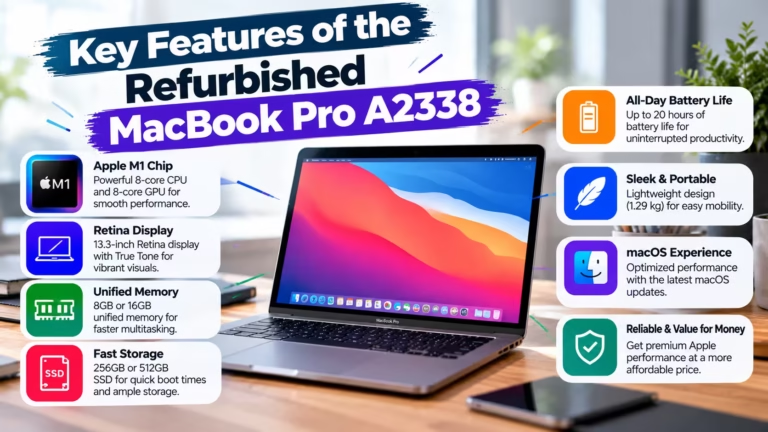
Key Features of the Refurbished MacBook Pro A2338
1. Apple M1 Chip for Efficient Performance
The Apple M1 chip combines an 8-core CPU, an 8-core GPU, and a 16-core Neural Engine in a single system-on-chip design.
As a result, the laptop can handle everyday productivity, multitasking, coding, photo editing, and supported creative applications efficiently.
Moreover, Apple’s integration of hardware and software helps compatible applications run smoothly. However, performance varies according to the workload, application version, and available memory.
2. 13.3-Inch Retina Display
The MacBook Pro A2338 features a 13.3-inch Retina display with a resolution of 2560 × 1600 pixels.
Additionally, it supports True Tone technology, P3 wide colour, and brightness of up to 500 nits. These features provide detailed visuals for documents, presentations, images, and videos.
Therefore, the display is suitable for students, office professionals, and users who regularly work with visual content.
3. Unified Memory for Multitasking
The M1 MacBook Pro A2338 is available with 8GB or 16GB of unified memory, depending on the original configuration.
Unified memory allows the M1 chip to access a shared memory pool for CPU and GPU tasks. Consequently, supported applications can use system resources efficiently.
The 8GB configuration can suit everyday browsing, office applications, and moderate multitasking. Meanwhile, 16GB may be more suitable for larger projects, development tools, and demanding creative workflows.
Important: The memory is integrated into the system and cannot be upgraded later. Choose the capacity that suits your expected workload.
4. SSD Storage for Fast Access
The MacBook Pro A2338 uses SSD storage, which helps applications launch quickly and files load responsively.
Available original configurations include 256GB, 512GB, 1TB, and 2TB SSD options. However, the exact capacity depends on the specific unit being sold.
If you store large video files, development projects, or extensive media libraries, consider a higher-capacity configuration. Alternatively, compatible external storage can help expand your available space.
5. Long Battery Life
Apple rated the original M1 MacBook Pro for up to 17 hours of wireless web browsing and up to 20 hours of Apple TV app movie playback under its test conditions.
However, a refurbished unit may deliver less battery life because battery health changes with age and usage.
Therefore, ask the seller about battery condition and expected backup before buying. Published battery figures for a new model should not be treated as a guarantee for a refurbished unit.
6. Portable Design and Useful Connectivity
The 13-inch MacBook Pro combines a compact design with a backlit Magic Keyboard, Touch Bar, Touch ID, and Force Touch trackpad.
It includes two Thunderbolt / USB 4 ports and a headphone jack. These ports support charging, compatible displays, and data transfer.
However, users who connect several peripherals may need a compatible USB-C hub or dock.
Refurbished MacBook Pro A2338 Performance Review
The M1 MacBook Pro A2338 remains capable of handling many everyday and professional tasks. Its performance makes it suitable for users who want a compact laptop with Apple’s software ecosystem.
Performance for Students
Students can use the MacBook for online classes, research, presentations, documents, and web browsing.
Furthermore, its portable design makes it convenient to carry between classes, libraries, and home. The 8GB configuration may be sufficient for many common academic tasks.
Performance for Office and Business Work
For business users, the M1 MacBook Pro can handle spreadsheets, video meetings, email, presentations, and multiple applications.
In addition, its efficient processor and battery design make it useful for working away from a desk. Nevertheless, check compatibility with your company’s software and peripherals before purchasing.
Performance for Programming
Developers can use the M1 MacBook Pro for coding, web development, and supported development environments.
However, some older tools, specialised applications, and virtualisation workflows may require additional compatibility checks. If your work depends on Windows-only software, verify whether an appropriate solution is available on macOS before buying.
Performance for Photo and Video Editing
The M1 chip and integrated graphics can support many photo-editing applications and suitable video-editing workflows.
Moreover, the Retina display provides detailed visuals for creative work. Nevertheless, performance depends on the editing software, project size, video resolution, and memory capacity.
For demanding professional workflows, compare the A2338 with newer Apple silicon models before making your final choice.
Refurbished MacBook Pro A2338 vs Intel MacBook Pro
The M1 MacBook Pro A2338 differs from older Intel-based MacBook Pro models in several important ways.
| Feature | MacBook Pro A2338 M1 | Older Intel MacBook Pro |
|---|---|---|
| Processor | Apple M1 chip | Intel Core processor |
| Power efficiency | Generally higher | Varies by model |
| Supported applications | Native Apple silicon apps and compatible Intel apps | Intel-compatible apps |
| Battery performance | Strong original battery ratings | Depends on model and battery condition |
| Memory | Unified memory integrated into the system | Depends on model; some have upgrade limitations |
| Software compatibility | Check current macOS and application support | Check current macOS and application support |
| Best suited for | Efficient everyday and supported professional workflows | Users who need specific Intel-based compatibility |
Overall, the M1 model can offer a strong combination of performance and efficiency. However, the best choice depends on your applications, budget, and software requirements.
Who Should Buy a Refurbished MacBook Pro A2338?
The refurbished MacBook Pro A2338 may suit:
Students: For assignments, research, online learning, and presentations.
Business professionals: For documents, meetings, spreadsheets, and communication.
Developers: For supported programming tools and development workflows.
Designers: For photo editing and compatible design applications.
Content creators: For supported editing and media production tasks.
Everyday users: For browsing, streaming, email, and personal productivity.
However, buyers who need the newest hardware, more memory, or specific professional software should compare alternative models before deciding.
What to Check Before Buying a Refurbished MacBook Pro A2338
A careful inspection helps you avoid unexpected costs after purchase.
Check the Processor and Configuration
Confirm whether the laptop has the M1 or M2 chip. The A2338 model number covers both generations, so do not rely on the model number alone.
Next, verify the RAM and SSD capacity listed for the actual unit.
Check Battery Health
Ask the seller about battery condition and whether the battery has been tested. A refurbished laptop’s battery performance may differ significantly from its original factory rating.
Inspect the Display and Keyboard
Check for display marks, dead pixels, uneven brightness, keyboard problems, Touch Bar issues, and Touch ID functionality.
Additionally, test the trackpad, speakers, webcam, Wi-Fi, and available ports.
Verify Activation and Ownership
Confirm that the previous owner’s Apple Account and Activation Lock have been removed. The device should be ready for you to set up with your own account.
Review Warranty and Accessories
Check the warranty duration, coverage, exclusions, return terms, and included charger.
Finally, compare the total cost with the condition and configuration offered.
Is a Refurbished MacBook Pro A2338 Worth Buying?
A refurbished MacBook Pro A2338 can be worth considering if you want an M1-powered Apple laptop at a lower price than a newer model.
Its efficient processor, Retina display, SSD storage, and compact design suit many common professional and personal workloads. In addition, buying refurbished may help reduce the upfront cost.
However, it is important to consider the model’s age, battery condition, non-upgradable memory, and software compatibility. Compare the available configuration with your actual requirements rather than choosing based on price alone.
Explore the refurbished Apple MacBook collection to compare available models and configurations.
We Also Sell
Vision IT Peripherals offers refurbished computing products and accessories for different requirements.
Note: A MacBook does not automatically include a separate Microsoft Windows license. Windows installation and compatibility options depend on the Mac’s hardware and intended use. Confirm compatibility before purchasing a Windows license for a MacBook.
Frequently Asked Questions
1. What is the Apple MacBook Pro A2338?
The A2338 model number identifies 13-inch MacBook Pro models with Apple silicon, including the M1 version introduced in 2020 and a later M2 version. Confirm the chip generation before purchasing.
2. What is the price of a refurbished MacBook Pro A2338 in India?
Vision IT’s listed price range is approximately ₹58,390–₹84,390, including GST, depending on the selected configuration and warranty. Check the product listing for current prices.
3. Is the MacBook Pro A2338 good for professional work?
Yes, the M1 version can handle many office, development, photo-editing, and supported video-editing tasks. However, performance depends on the application and memory configuration.
4. Can I upgrade the RAM or SSD in a MacBook Pro A2338?
The M1 MacBook Pro’s unified memory and internal SSD are not user-upgradeable in the usual way. Therefore, choose sufficient RAM and storage before purchasing.
5. How long does the MacBook Pro A2338 battery last?
Apple’s original M1 model ratings reached up to 17 hours of wireless web browsing under test conditions. However, battery life in a refurbished unit depends on its battery health and usage.
6. Is a refurbished MacBook Pro worth buying?
It can be a good value if the price, condition, battery health, specifications, and warranty meet your needs. Always check software compatibility before purchasing.
7. Is the MacBook Pro A2338 suitable for students?
Yes, it can support research, assignments, online learning, presentations, and many productivity applications. Check that the software required for your course runs on macOS.
Final Verdict: Is the Refurbished MacBook Pro A2338 Right for You?
The Apple MacBook Pro A2338 with the M1 chip remains a capable choice for users who need portable performance, a Retina display, and efficient multitasking.
It can suit students, professionals, developers, and creative users who want to enter the Apple ecosystem without paying the price of a newer MacBook. However, check the exact chip, memory, SSD capacity, battery health, and warranty before ordering.
If the configuration meets your requirements and the price fits your budget, explore the refurbished Apple MacBook collection at Vision IT Peripherals to compare available options.
