

The Ryzen 7 7800X3D vs Ryzen 7 5800X comparison matters for gamers who want better performance without wasting money on an unnecessary upgrade. Both processors have 8 cores and 16 threads, but they use different AMD platforms and memory standards. The Ryzen 7 5800X uses the AM4 platform and DDR4 memory, while the Ryzen 7 7800X3D uses AM5 and DDR5.
The 7800X3D also includes 3D V-Cache, which can provide a major gaming advantage in CPU-limited situations. Therefore, whether you should upgrade depends on your current motherboard, graphics card, gaming resolution, frame-rate target, and total upgrade budget.
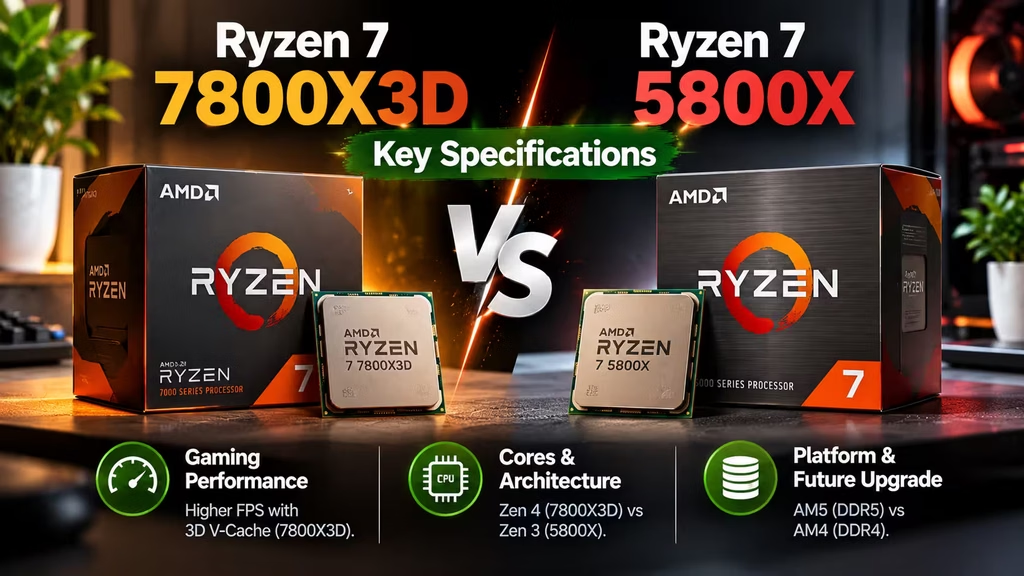
Ryzen 7 7800X3D vs Ryzen 7 5800X: Key Specifications
| Feature | Ryzen 7 7800X3D | Ryzen 7 5800X |
| Architecture | Zen 4 | Zen 3 |
| Platform | AM5 | AM4 |
| Cores | 8 | 8 |
| Threads | 16 | 16 |
| Base Clock | 4.2 GHz | 3.8 GHz |
| Boost Clock | Up to 5.0 GHz | Up to 4.7 GHz |
| L3 Cache | 96 MB | 32 MB |
| TDP | 120W | 105W |
| Memory | DDR5 | DDR4 |
| Integrated Graphics | Yes | No |
| 3D V-Cache | Yes | No |
Both CPUs offer 8 cores and 16 threads, so the biggest differences come from their architecture, cache, platform, and memory support.
Ryzen 7 7800X3D vs Ryzen 7 5800X: Architecture
The Ryzen 7 5800X is based on AMD’s Zen 3 architecture and uses the AM4 socket. It remains a capable processor for gaming, productivity, and everyday desktop workloads.
The Ryzen 7 7800X3D uses the newer Zen 4 architecture and requires an AM5 motherboard. Its biggest advantage for gaming comes from AMD’s 3D V-Cache technology.
The 7800X3D has 96 MB of L3 cache, compared with 32 MB on the 5800X. This additional cache can help certain games access frequently used data more efficiently.
As a result, the 7800X3D can deliver higher gaming performance when the processor becomes the limiting factor.
What Makes the Ryzen 7 7800X3D Different?
The biggest feature of the 7800X3D is its large amount of 3D V-Cache.
Instead of relying only on higher clock speeds, AMD added extra cache to the processor. Games can benefit from this because important data can remain closer to the CPU.
The advantage is not the same in every game. Some titles respond strongly to additional cache, while others depend more heavily on the graphics card.
Therefore, the 7800X3D is especially attractive to gamers who want high frame rates and have a powerful GPU.
Gaming Performance
For gaming, the Ryzen 7 7800X3D vs Ryzen 7 5800X comparison generally favors the 7800X3D.
The newer processor can deliver higher frame rates and better performance in CPU-limited games. The difference can become more noticeable when you pair the CPU with a powerful graphics card.
At 1080p, the CPU can have a greater influence on frame rates, particularly when using a high-end GPU and a high-refresh-rate monitor.
At 1440p and 4K, the graphics card often becomes the main limitation. Therefore, the difference between the two processors may be smaller depending on the game and graphics settings.
If your current 5800X already delivers the frame rate you want, upgrading may not provide enough benefit to justify the total cost.
Ryzen 7 7800X3D vs Ryzen 7 5800X for Productivity
Gaming is where the 7800X3D has its strongest advantage, but both processors can handle many productivity tasks.
The 5800X and 7800X3D both provide 8 cores and 16 threads. This makes them suitable for office applications, coding, browsing, multitasking, and many content creation tasks.
The newer Zen 4 architecture can provide stronger performance in many single-threaded workloads.
However, the 7800X3D is primarily designed as a high-performance gaming CPU. If your main workload involves heavy rendering, video encoding, or other highly threaded applications, another processor may provide better value.
For a PC that combines gaming with everyday productivity, the 7800X3D remains a strong option.
Do You Need a New Motherboard?
Yes. This is one of the most important points in the Ryzen 7 7800X3D vs Ryzen 7 5800X upgrade decision.
The 5800X uses the AM4 socket, while the 7800X3D uses AM5.
Because of this difference, you cannot install the 7800X3D directly into an AM4 motherboard.
An AM5 motherboard is required, and the new platform also requires DDR5 memory.
Therefore, moving from the 5800X to the 7800X3D involves more than replacing the processor.
DDR4 vs DDR5: Another Upgrade Cost
The Ryzen 7 5800X works with DDR4 memory. If you already have 16 GB or 32 GB of good DDR4 RAM, your existing memory can continue to serve your AM4 system.
The 7800X3D requires DDR5 memory.
That means an AM4-to-AM5 upgrade may require three major purchases: the processor, motherboard, and RAM.
This can significantly increase the total cost.
However, AM5 provides a newer platform that can support future processor upgrades. For someone building a new gaming PC, this can make the additional investment more reasonable.
Should You Upgrade From the Ryzen 7 5800X?
The answer depends on your current hardware and gaming goals.
If your 5800X delivers the frame rates you want, there may be little reason to replace it.
An upgrade makes more sense if you have a powerful GPU and notice that your processor is limiting performance.
Competitive gamers who target very high frame rates can also benefit more from a faster gaming CPU.
For example, a player using a high-end GPU and a 240 Hz monitor at 1080p may see more value from the 7800X3D than someone playing at 4K with a mid-range graphics card.
When Should You Keep the Ryzen 7 5800X?
Keeping the 5800X makes sense when your current gaming performance is already satisfactory.
It is also a practical choice when the cost of replacing the motherboard and RAM is too high for the expected performance improvement.
AM4 users can also explore other compatible processor upgrades depending on their motherboard and budget.
For some systems, upgrading the graphics card, adding more RAM, or moving to a faster SSD may provide a better overall improvement than replacing the CPU.
When Is the Ryzen 7 7800X3D Worth It?
The 7800X3D is worth considering when gaming performance is your main priority.
It is especially attractive for high-refresh-rate gaming and systems with powerful graphics cards.
The processor also makes more sense if you are building a new PC. You avoid the cost of replacing an existing AM4 system because you are starting with the AM5 platform from the beginning.
In addition, DDR5 and AM5 give the system a newer hardware foundation for future upgrades.
Ryzen 7 7800X3D vs Ryzen 7 5800X: Which One Should You Choose?
| Use Case | Better Choice |
| Existing AM4 gaming PC | Ryzen 7 5800X |
| New gaming PC | Ryzen 7 7800X3D |
| High-refresh-rate gaming | Ryzen 7 7800X3D |
| Budget-focused upgrade | Ryzen 7 5800X |
| Powerful high-end GPU | Ryzen 7 7800X3D |
| Existing DDR4 system | Ryzen 7 5800X |
| New AM5 build | Ryzen 7 7800X3D |
The right processor depends on your complete system rather than the CPU alone.
Frequently Asked Questions
Is the Ryzen 7 7800X3D faster than the Ryzen 7 5800X?
Yes. The 7800X3D generally provides stronger gaming performance, particularly in CPU-limited games. The actual difference depends on the game, GPU, resolution, and settings.
Can I use the Ryzen 7 7800X3D on an AM4 motherboard?
No. The Ryzen 7 7800X3D requires an AM5 motherboard.
Does the Ryzen 7 7800X3D support DDR4 RAM?
No. The 7800X3D uses DDR5 memory, while the Ryzen 7 5800X uses DDR4.
Is the Ryzen 7 5800X still good for gaming?
Yes. The 5800X remains a capable 8-core processor and can provide strong gaming performance when paired with a suitable graphics card.
Is upgrading from a 5800X to a 7800X3D worth it?
It can be worthwhile for gamers who want higher frame rates and have a powerful GPU. However, remember that the upgrade requires an AM5 motherboard and DDR5 memory.
Should I upgrade my GPU or CPU first?
If your GPU is already powerful but your CPU is limiting frame rates, a CPU upgrade can help. If your graphics card is the main performance limit, upgrading the GPU will usually provide a larger improvement.
Final Verdict
The Ryzen 7 7800X3D vs Ryzen 7 5800X decision is not simply about choosing the newer processor. The 7800X3D is clearly the stronger gaming CPU, thanks to its Zen 4 architecture and 3D V-Cache.
However, moving from a 5800X to a 7800X3D requires an AM5 motherboard and DDR5 memory. That makes the total upgrade considerably more expensive than a simple CPU replacement.
If you are building a new gaming PC, the 7800X3D is the more attractive choice. If you already own a 5800X and your system performs well, keeping your current platform can be the smarter financial decision.
Ultimately, upgrade when your current CPU is actually limiting your gaming experience. If it is not, putting the money toward a stronger GPU, more storage, or another component may provide better value.
Also chek: Windows licensing
