

The 14-inch vs 16-inch MacBook Pro M1 comparison helps you choose the right laptop based on performance, display size, portability, battery life, and workload. The 14-inch MacBook Pro A2442 is compact and easier to carry, making it suitable for professionals who travel frequently. In contrast, the 16-inch MacBook Pro A2485 offers a larger display and a bigger battery for demanding tasks.
Both models are available with M1 Pro or M1 Max chip options, depending on the configuration. This comparison helps developers, video editors, designers, photographers, and business users select the MacBook Pro that best fits their needs.
14-inch vs 16-inch MacBook Pro M1: What Is the Difference?
The biggest difference between these MacBook Pro models is the balance between portability and workspace.
The 14-inch MacBook Pro A2442 has a 14.2-inch Liquid Retina XDR display. As a result, it provides professional performance in a compact design. The smaller chassis also makes it easier to carry between home, office, meetings, studios, and other locations.
On the other hand, the 16-inch MacBook Pro A2485 has a larger 16.2-inch Liquid Retina XDR display. Therefore, it provides more room for video timelines, spreadsheets, code, editing panels, and multiple application windows.
Both models were available with M1 Pro and M1 Max configurations. So, you can choose between balanced professional performance and higher graphics capability.
14-inch vs 16-inch MacBook Pro M1: 14-inch A2442
The 14-inch MacBook Pro A2442 combines professional performance with a compact design.
Its 14.2-inch Liquid Retina XDR display provides a detailed workspace while keeping the laptop relatively easy to carry. Therefore, it can be useful for professionals who regularly move between different locations.
The M1 Pro configuration can handle demanding tasks such as:
- Office and business applications
- Web development
- Programming
- Photo editing
- Video editing
- Music production
- Graphic design
- Multitasking
For heavier creative workloads, however, the M1 Max provides additional GPU capability. As a result, it can be useful for demanding video editing, 3D work, motion graphics, and other GPU-intensive applications.
14-inch vs 16-inch MacBook Pro M1: 16-inch A2485
The 16-inch MacBook Pro A2485 is designed for professionals who want a larger working area.
Its 16.2-inch Liquid Retina XDR display provides more room for timelines, spreadsheets, code, editing panels, and multiple application windows. Therefore, it can make professional work more comfortable.
For example, video editors can see more of their timeline. Similarly, designers can keep more tools visible. Developers can also work with code, terminals, documentation, and other windows more comfortably.
However, the larger display also means a larger chassis and higher weight.
Therefore, the 16-inch model is generally better suited to users who prioritize workspace over portability.
14-inch vs 16-inch MacBook Pro M1: M1 Pro vs M1 Max
The main difference between the M1 Pro and M1 Max is graphics capability and memory support.
The M1 Pro can be configured with up to 10 CPU cores and 16 GPU cores. In comparison, the M1 Max can also reach up to 10 CPU cores but offers up to 32 GPU cores.
The M1 Pro supports up to 32GB of unified memory, while the M1 Max supports configurations up to 64GB. Consequently, the M1 Max is particularly attractive for demanding professional workloads that can use additional GPU resources and memory.
M1 Pro: Who Should Choose It?
The M1 Pro is a strong choice for users who want professional performance without paying for maximum GPU capability.
It can suit:
- Developers
- Office professionals
- Photographers
- Designers
- Content creators
- Video editors
- Music producers
- Creative students
- Business users
For many professional workloads, the M1 Pro provides an excellent balance between performance, efficiency, and cost.
Therefore, there is little reason to choose an M1 Max if your regular workload rarely uses intensive GPU processing.
M1 Max: Who Should Choose It?
The M1 Max is better suited to users who regularly work with demanding professional applications.
For example, it can make more sense for:
- Professional video editors
- 3D artists
- Motion graphics designers
- High-end photographers
- Visual effects professionals
- Developers with demanding workloads
- Creative professionals handling large projects
The additional GPU cores become valuable when software can take advantage of graphics processing.
However, users should not select the M1 Max simply because it is the higher-tier chip. For everyday office work, browsing, programming, and light creative tasks, the M1 Pro may already provide more than enough performance.
14-inch vs 16-inch MacBook Pro M1: Display and Workspace
Screen size can significantly affect your daily working experience.
The 14-inch MacBook Pro A2442 has a 14.2-inch display, while the 16-inch MacBook Pro A2485 has a 16.2-inch display.
Both models use Apple’s Liquid Retina XDR display technology and support ProMotion with adaptive refresh rates up to 120Hz.
The 16-inch model provides more physical workspace. Therefore, it can be particularly useful when you are:
- Editing video timelines
- Working with large spreadsheets
- Writing and reviewing code
- Using professional design software
- Managing multiple windows
- Working with detailed creative projects
By contrast, the 14-inch model focuses more strongly on portability.
As a result, you sacrifice some screen space, but you get a laptop that is easier to carry throughout the day.
14-inch vs 16-inch MacBook Pro M1: Battery and Portability
Battery capacity is another important difference.
The 14-inch MacBook Pro has a 70Wh battery, while the 16-inch model has a larger 100Wh battery.
The larger battery helps the 16-inch model deliver strong battery performance while powering its larger display. However, battery life varies according to the configuration, workload, brightness, applications, and operating conditions.
The 14-inch version remains the more convenient option for frequent travel. Therefore, if you regularly move between home, office, client meetings, college, or studios, the smaller chassis can make a noticeable difference.
On the other hand, professionals who primarily work at a desk may prefer the larger display and battery capacity of the 16-inch model.
14-inch vs 16-inch MacBook Pro M1: Memory and Storage
Do not compare these MacBook Pro models only by looking at the M1 Pro or M1 Max name.
Unified memory and SSD storage are also important. In addition, storage capacity can have a direct impact on how comfortably you manage large projects.
The M1 Pro supports up to 32GB of unified memory, while the M1 Max can support up to 64GB.
Storage options also vary between configurations. Therefore, professionals working with large video files, RAW photographs, development projects, design assets, or other large files may benefit from a larger SSD.
A larger internal SSD can reduce the need to frequently move files to external storage. As a result, it can make large projects easier to manage.
When buying a pre-owned MacBook Pro, always check the exact RAM and SSD configuration.
Furthermore, two MacBook Pro models with the same M1 Pro or M1 Max chip can still have different memory and storage configurations.
14-inch vs 16-inch MacBook Pro M1: Which Is Better for Video Editing?
Both the 14-inch and 16-inch MacBook Pro can provide excellent video-editing performance.
For standard 4K projects and regular content creation, an M1 Pro MacBook Pro can provide more than enough performance. However, the M1 Max becomes more attractive when projects involve demanding effects, multiple high-resolution video streams, complex timelines, 3D effects, or other GPU-heavy workloads.
The 16-inch display can also make editing more comfortable because it provides additional workspace for timelines and editing panels.
Meanwhile, the 14-inch model provides a better balance between screen size and portability for editors who frequently travel.
Therefore, video editors should consider both the chip and physical laptop size before making a decision.
14-inch vs 16-inch MacBook Pro M1: Which Is Better for Developers?
Both models provide excellent performance for software development.
The M1 Pro can comfortably handle coding environments, browsers, databases, terminals, development tools, and multitasking. Therefore, it can suit many developers without requiring the higher-tier M1 Max.
For more demanding development workloads, however, the M1 Max may make sense when the work involves simulations, large datasets, graphics processing, machine-learning workloads, or other applications that can use additional GPU resources.
Screen size also matters for developers.
The 16-inch model provides more room for code, terminals, documentation, browsers, and development tools. On the other hand, the 14-inch model is easier to carry between home, office, and other work locations.
14-inch vs 16-inch MacBook Pro M1: Business and Everyday Professional Work
For office work, business applications, browsing, communication, programming, and moderate creative tasks, the M1 Pro can already provide strong performance.
The 14-inch model is particularly useful when portability is important. Meanwhile, the 16-inch model makes more sense when you spend most of your working day at a desk and need more screen space for documents, spreadsheets, applications, and multitasking.
14-inch vs 16-inch MacBook Pro M1: Should You Buy Pre-Owned?
A pre-owned MacBook Pro can be a practical choice when you want professional Apple silicon performance at a lower cost than a new machine.
However, do not judge a pre-owned MacBook only by its model number.
Before buying, check:
- Exact M1 Pro or M1 Max configuration
- Unified memory capacity
- SSD capacity
- Battery health
- Battery cycle count
- Display condition
- Keyboard and trackpad
- Ports
- Camera and speakers
- Charger
- macOS compatibility
- Physical condition
- Warranty
A complete inspection is especially important because two units with the same model number can have different configurations and conditions.
If you are comparing other systems, you can also explore refurbished laptops based on your performance requirements and budget.
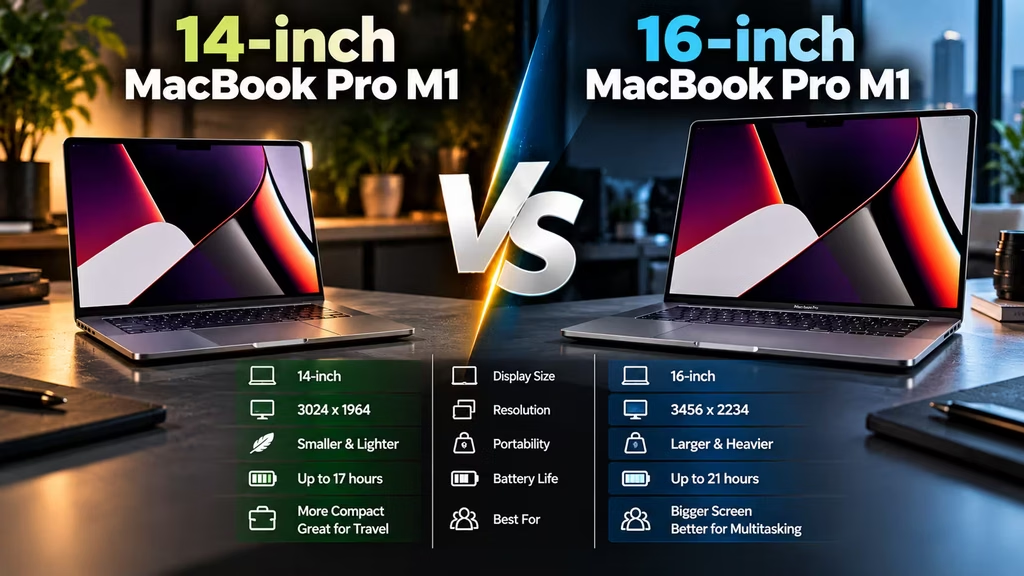
14-inch vs 16-inch MacBook Pro M1: Quick Comparison
Display
The 14-inch model has a 14.2-inch Liquid Retina XDR display. In contrast, the 16-inch model provides a larger 16.2-inch display.
Performance
Both models can use M1 Pro or M1 Max configurations. Therefore, your workload should determine which chip makes more sense.
GPU Capability
M1 Max configurations provide higher GPU capability than M1 Pro configurations. As a result, they can benefit demanding creative applications.
Memory
M1 Pro configurations support up to 32GB of unified memory. Meanwhile, M1 Max configurations support up to 64GB.
Battery
The 14-inch model has a 70Wh battery, while the 16-inch model has a 100Wh battery.
Portability
The 14-inch model is easier to carry. On the other hand, the 16-inch model prioritizes screen space and a larger chassis.
| Feature | 14-inch A2442 M1 Pro | 14-inch A2442 M1 Max | 16-inch A2485 M1 Pro | 16-inch A2485 M1 Max |
|---|---|---|---|---|
| Display | 14.2-inch Liquid Retina XDR | 14.2-inch Liquid Retina XDR | 16.2-inch Liquid Retina XDR | 16.2-inch Liquid Retina XDR |
| Chip | M1 Pro | M1 Max | M1 Pro | M1 Max |
| GPU | Up to 16 cores | Up to 32 cores | Up to 16 cores | Up to 32 cores |
| Unified Memory | Up to 32GB | Up to 64GB | Up to 32GB | Up to 64GB |
| Battery | 70Wh | 70Wh | 100Wh | 100Wh |
| Portability | Excellent | Excellent | Good | Good |
| Screen Workspace | High | High | Very High | Very High |
| Best For | Professional everyday work | Portable high-end work | Desk-based professional work | Demanding creative work |
| Graphics Work | Very Good | Excellent | Very Good | Excellent |
Which 14-inch vs 16-inch MacBook Pro M1 Should You Pick?
Your choice should start with your workload and working style.
Choose the 14-inch A2442 M1 Pro
Choose the 14-inch A2442 with M1 Pro if you want strong professional performance in a portable package.
It is suitable for business users, developers, photographers, designers, students, and content creators who value mobility.
Choose the 14-inch A2442 M1 Max
Choose the 14-inch A2442 with M1 Max if you need additional GPU performance but still want a compact professional laptop.
Therefore, this combination can suit creative professionals who travel frequently.
Choose the 16-inch A2485 M1 Pro
Choose the 16-inch A2485 with M1 Pro if you want a large professional display but do not need maximum GPU performance.
It can be useful for developers, business professionals, designers, and content creators who work mainly at a desk.
Choose the 16-inch A2485 M1 Max
Choose the 16-inch A2485 with M1 Max if you work with demanding creative applications and want the strongest combination of graphics performance and screen space.
As a result, this configuration can suit professional video editors, 3D artists, motion graphics designers, and visual effects professionals.
Consider a Pre-Owned MacBook Pro
A pre-owned MacBook Pro can offer a practical way to access professional Apple silicon hardware.
However, check the exact configuration, battery condition, SSD, RAM, physical condition, and warranty before purchasing.
Frequently Asked Questions
Is the 14-inch vs 16-inch MacBook Pro M1 comparison important before buying?
Yes. The two sizes offer different balances between portability, screen workspace, battery capacity, and professional usability. Therefore, your workload should guide the choice.
Is M1 Max better than M1 Pro?
Yes, the M1 Max provides higher GPU capability and supports more unified memory. However, the M1 Pro can be a better-value choice for users who do not need maximum graphics performance.
Is the 14-inch MacBook Pro better for travel?
Yes. The 14-inch MacBook Pro has a smaller design, making it more convenient for frequent travel. At the same time, it still provides professional performance.
Is the 16-inch MacBook Pro better for video editing?
It can be. The larger 16.2-inch display provides more workspace for timelines and editing tools. In addition, the M1 Max configuration is useful for demanding GPU-intensive video workloads.
How much RAM can the M1 Pro MacBook Pro support?
The M1 Pro supports configurations with up to 32GB of unified memory.
How much RAM can the M1 Max MacBook Pro support?
The M1 Max supports configurations with up to 64GB of unified memory.
Which is better for programming, 14-inch or 16-inch MacBook Pro?
Both are excellent for programming. Choose the 16-inch model if you value additional screen space for code, terminals, and documentation. Conversely, choose the 14-inch model if portability is more important.
Is a pre-owned MacBook Pro M1 worth buying?
It can be worth buying when the exact configuration, battery condition, physical condition, and warranty are verified. Therefore, compare the complete specification rather than only the model number.
What should I check before buying a pre-owned MacBook Pro?
Check the exact M1 Pro or M1 Max configuration, unified memory, SSD capacity, battery health, cycle count, display, keyboard, trackpad, ports, charger, physical condition, macOS compatibility, and warranty.
Final Verdict
The 14-inch vs 16-inch MacBook Pro M1 decision ultimately depends on how you work.
The M1 Pro is the balanced performance option, while the M1 Max is the stronger choice for demanding graphics workloads.
The 14-inch A2442 focuses on portability, while the 16-inch A2485 focuses on a larger professional workspace.
For developers, business professionals, photographers, and general content creators, the M1 Pro can provide excellent performance. However, professional video editors, 3D artists, motion graphics designers, and other users with demanding GPU workloads can benefit from the additional performance of the M1 Max.
Before buying a pre-owned MacBook Pro, check the exact chip, unified memory, SSD capacity, battery condition, cycle count, display condition, ports, charger, physical condition, and warranty.
Most importantly, compare the complete configuration rather than choosing only by the M1 Pro, M1 Max, A2442, or A2485 model name.
Overall, the best MacBook Pro is the one that provides the performance you need while matching your preferred screen size, portability, workload, and budget.
We Also Sell
Vision IT also offers refurbished and pre-owned IT hardware, including refurbished laptops, desktops, workstations, MacBooks, monitors, RAM, SSDs, HDDs, motherboards, adapters, and other computer peripherals.
Finally, for genuine Microsoft licensing requirements, explore Genuine Microsoft Windows Licenses.
